Packet Tracer, but for AI agents
Everybody builds agents. Nobody sees them.
I have a small team of AI agents that work for me. They plan, they write code, they review each other, they test. They have been talking to each other for months.
Thousands of messages. Hundreds of pairs of agents talking. All of it stored in rows and columns.
And that was the problem. I could read that a message had been refused. I could not see it.
Reading status = REFUSED in row 4 812 of a table tells you nothing. You do not feel where the work got stuck. You do not see that the same agent refuses the same thing every single time. A table hides the shape of the conversation.
The idea comes from Packet Tracer
If you ever studied networks, you used Packet Tracer. You drop routers on a canvas, you draw cables between them, you press play — and little envelopes travel down the cables. When one gets dropped, you see it drop.
Nobody has to explain a network to you after that. You watched it.
I reused the same mapping, term for term:
| Packet Tracer | Agent Tracer |
|---|---|
| a device | an agent |
| a cable | a pair of agents that talk |
| a packet | one message |
| a dropped packet | a refusal — with the reason attached |
That is the whole design. There is nothing else in it.
What it looks like
Agent Tracer is one HTML file. You open it in a browser and it starts moving on its own: a demo conversation between a planner, a coder, a reviewer and a tester plays out, envelope by envelope.
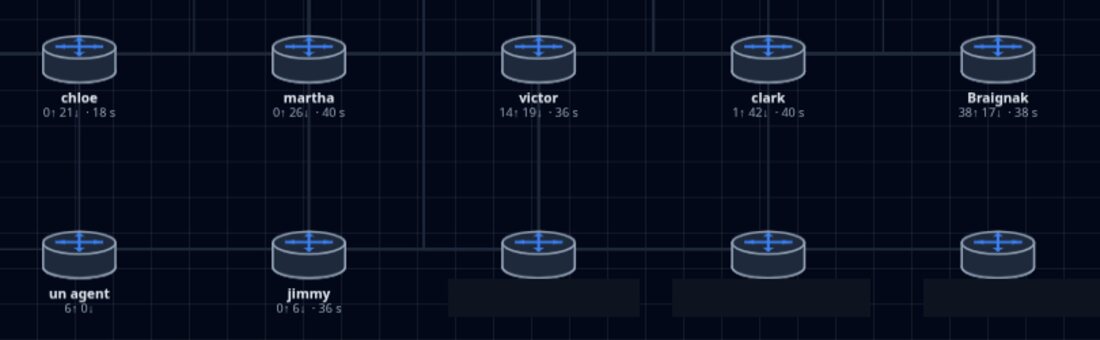
- Each agent is a box on the board.
- Each message is an envelope sliding from one box to the other.
- Green envelope: the gate said yes, the work goes through.
- Red envelope: the gate refused — and the reason is written on screen.
You can press Pause, press Step to walk one message at a time, or click any line in the log to jump straight to that moment.
No build step. No npm install. No dependencies. No server. It works with the wifi off.
The part that actually matters: the red ones
Most agent dashboards show you throughput. Tokens burned, tasks finished, a nice green line going up.
That is the least interesting half of the story.
An agent that can only say yes is not an agent. It is a pipe. The moment your system becomes trustworthy is the moment something in it is allowed to say no — and then tells you why it said no.
So Agent Tracer makes refusals the loudest thing on the screen. A red envelope carries a why field, and that field is printed in full:
REFUSE — "the patch swallows the error" why: a caught exception with an empty body hides the failure. Log it or re-raise it.
That one line is worth more than a hundred green ones. It is the only place where the system teaches you something.
There is a sentence taped above my desk:
A gate that never refused guards nothing.
If you run your logs through this and you see zero red, you have not built a safe system. You have built a system whose checks have never been tested.
The seven words
The messages use a tiny vocabulary borrowed from air traffic control. In a control tower, the controller gives a heading and the pilot repeats it back before turning. The readback is not politeness — it is how you catch a misunderstanding before the plane moves.
My agents talk the same way. Seven words, and only seven:
| Word | Meaning |
|---|---|
ASK | I ask you to do something |
READBACK | Understood — I repeat your order in my own words |
RUN | I am doing it |
DONE | Finished, here is the proof |
REFUSE | I will not, and here is why |
BLOCKED | I cannot continue, here is what blocks me |
DUNNO | I do not know, and here is what would settle it |
The first four are easy. The last three are the whole point.
DUNNO is my favourite. A model that cannot say "I don't know" will invent an answer instead — and an invented answer costs far more than a question. So the word exists, it is colour-coded, and it comes with a field for what would settle it.
Feeding it your own logs
Drag a file onto the page, or use Open my log…. Nothing is uploaded — there is no server to upload to, no fetch, no telemetry. The file is read in your browser and stays there.
The format is deliberately boring. Plain JSON, or one JSON object per line:
{
  "agents": ["planner", "coder", "reviewer"],
  "messages": [
    { "from": "planner",  "to": "coder", "verb": "ASK",
      "subject": "add a retry to the fetch call" },

    { "from": "coder",    "to": "planner", "verb": "READBACK",
      "subject": "understood: retry the fetch, three times, with a delay" },

    { "from": "reviewer", "to": "coder", "verb": "REFUSE",
      "subject": "the patch swallows the error",
      "why": "A caught exception with an empty body hides the failure." },

    { "from": "coder",    "to": "planner", "verb": "DUNNO",
      "subject": "how long should the delay be?",
      "why": "Two values are defensible and I will not guess. The service SLA would settle it." }
  ]
}
Three things make this easy to adopt:
agentsis optional. Leave it out and the board is rebuilt from whoever appears in the messages.verbis free text. The seven words above get colours; anything else still shows up, just in a neutral colour. Your vocabulary is not my business.whyis optional but it is the most valuable field you own. A refusal without a reason teaches nobody anything.
If your framework already writes a trace — LangGraph, CrewAI, AutoGen, or your own hand-rolled loop — turning it into this shape is a twenty-line script. Map your sender to from, your receiver to to, your status to verb, your error message to why. That is the entire integration.
Try it
- Live demo: https://fotsopatrick.github.io/agent-tracer/
- Source: https://github.com/fotsopatrick/agent-tracer
- Licence: Apache 2.0 — use it, change it, ship it.
Download the single file and it works offline, forever, with no version of anything to keep up to date.
Where this came from
Agent Tracer is the front door of something bigger I am building: a control tower where a team of agents does real work behind gates that are allowed to say no — automated checks, peer review between agents, and a human who has the last word on anything that goes out.
The tracer is the window into that tower. I pulled it out as a standalone file because the window turned out to be useful on its own, and because I would like to know whether it is useful to you too.
So: run your own agent log through it, and tell me how much red you see. If the answer is "none", that is the finding.